
- Navigate to your SharePoint site and the file or folder you would like to share.
- For this example, we will use a folder. Click the share icon next to the item you would like to share.

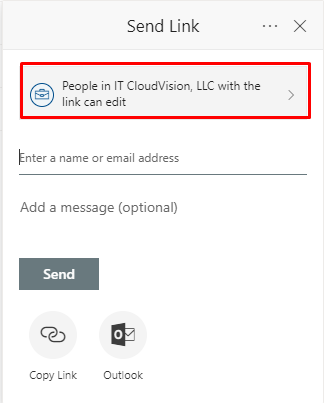
- Click the box to change the permissions. It may say something different, but it will be in the same place as in the image below.
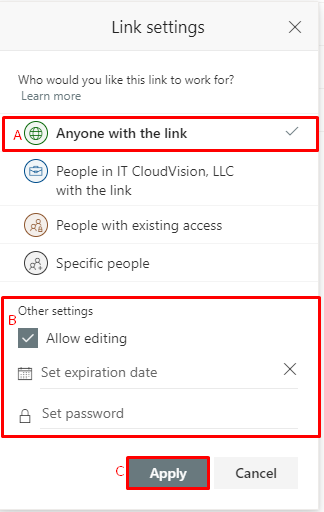
- Click “Anyone with the link” (A in the screenshot below). Then optionally set an expiration date and/or password in “Other Settings” section (B in screenshot below). Next, click “Apply” (C in screenshot below).
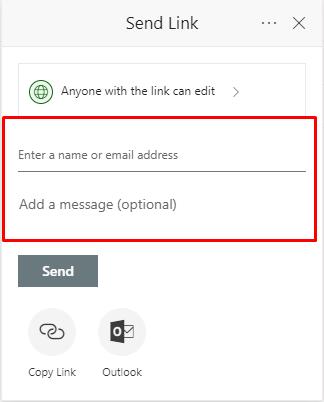
- Enter the email address and optionally a message to invite the user.
- Click “Send”.
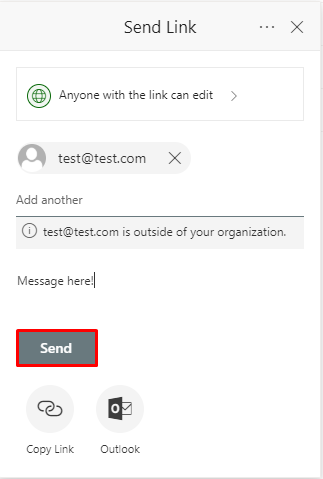
- That’s it, you’ve shared a SharePoint file with someone outside of your organization.
How to Share SharePoint Files Outside Your Organization
Have more questions? Submit a request
Article is closed for comments.
0 Comments