
Upload Photos
Upload files to OneDrive, such as documents, OneNote notebooks, photos, videos or music, with the Upload tool.
TIP: If your device is set to automatically upload pictures to OneDrive, pictures you take with your device will be in the OneDrive Camera roll folder. You don't have to upload them to OneDrive manually.
-
In the OneDrive app, open the folder you want to add a file to.
-
Tap Add
 at the bottom of the screen, and then tap Upload.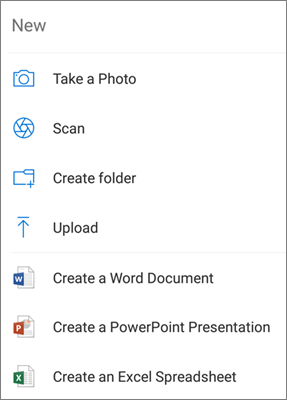
-
Tap the file you want to upload. It uploads to the folder you had opened.
Automatically upload photos and videos you take (personal OneDrive accounts only)
When you sign in to OneDrive for the first time, you'll be asked if you'd like to automatically upload photos and videos you take on your phone to OneDrive. Tap Turn on to turn on automatic upload. You can also turn this on from Settings. Here's how:
-
In the OneDrive app, tap Menu
 and then open Settings.
 -
Tap Camera upload.
-
Set Camera upload to ON.
0 Comments